Description:
In 60 seconds we'll explore the WHERE clause in SQL.
My SQL Server Udemy courses are:
70-461, 70-761 Querying Microsoft SQL Server with T-SQL: https://rebrand.ly/querying-microsoft-sql-server
98-364: Database Fundamentals (Microsoft SQL Server): https://rebrand.ly/database-fundamentals
70-462 SQL Server Database Administration (DBA): https://rebrand.ly/sql-server-dba
Microsoft SQL Server Reporting Services (SSRS): https://rebrand.ly/sql-server-ssrs
SQL Server Integration Services (SSIS): https://rebrand.ly/sql-server-ssis
SQL Server Analysis Services (SSAS): https://rebrand.ly/sql-server-ssas-mdx
Microsoft Power Pivot (Excel) and SSAS (Tabular DAX model): https://rebrand.ly/microsoft-powerpivot-ssas-tabular-dax
----
In this video, I'm going to show you how to use the SQL Server SELECT statement, including the WHERE clause. I'll demystify this complex statement and make it easy to understand.
If you want to know how to use the SQL Server SELECT statement, then you need to watch this video! I'll demystify the WHERE clause and make it easy to understand. By the end of this video, you'll be able to use the SELECT statement to retrieve data from a database.
---
The WHERE clause is the third clause in the SELECT statement in SQL, after the SELECT and FROM clauses.
It is used to reduce the number of rows which have been retrieved from the FROM clause.
You can retrieve only those rows where a column’s value is equal to a particular value or is less than, greater than, less than or equal to, greater than or equal to, or not equal to.
You can do searches based on whether one column’s value is greater than another column or a calculation.
You can also do searches for dates, such as using a date literal in single quotation marks in the order of year, month and day.
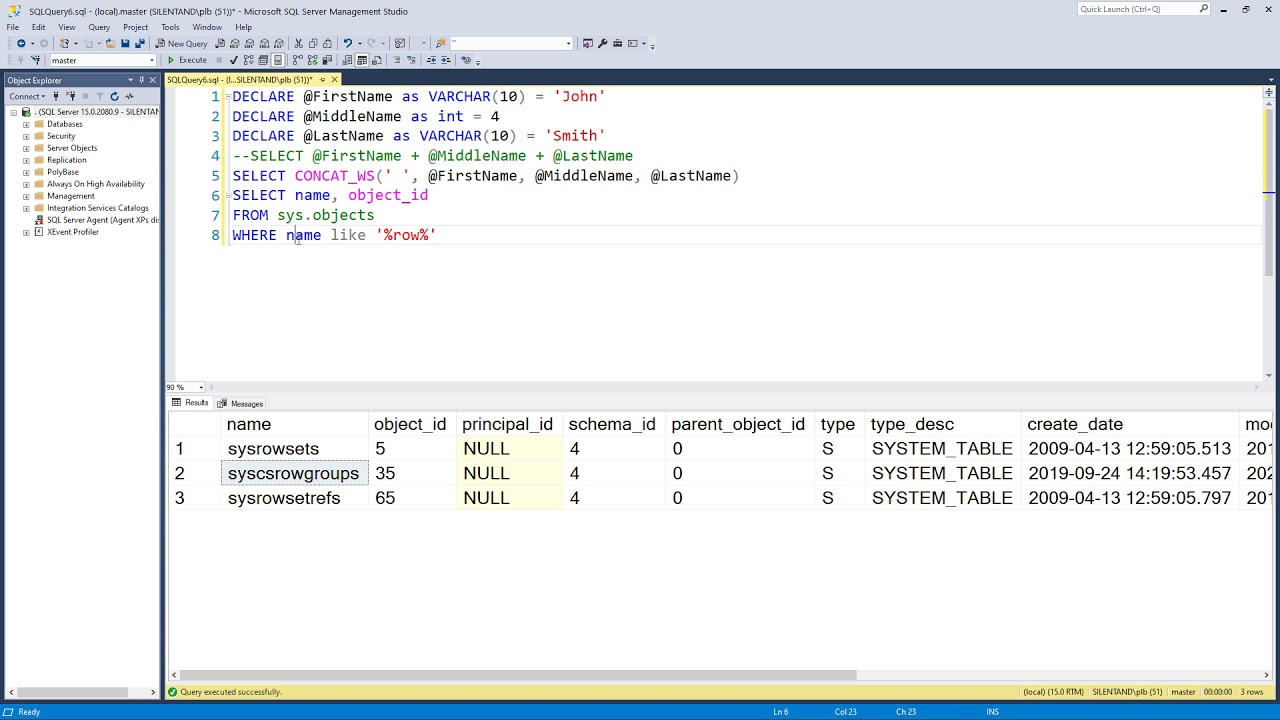
You can search through strings using the LIKE operator. The percentage sign means zero to infinite additional characters, so this will look for ‘sys’ at the beginning of a string.
You can search for more than one criterion by using AND, looking for all of the conditions to be true, and OR, which looks for at least one of the conditions to be true.
You can also search for the opposite using a NOT.
You can also search for empty values by using IS NULL. You can also use IS NOT NULL.
I’m Phillip Burton of I Do Data.com. Thanks for watching, and keep learning.
----
Links to my website are:
70-461, 70-761 Querying Microsoft SQL Server with T-SQL: http://idodata.com/querying-microsoft-sql-server-with-t-sql/
98-364: Database Fundamentals (Microsoft SQL Server): http://idodata.com/database-fundamentals-it-specialist-its-201-certification/
SQL Server Essential in an Hour: http://idodata.com/sql-server-essentials-in-an-hour-the-select-statement/
70-462 SQL Server Database Administration (DBA): http://idodata.com/sql-server-database-administration-dba/
DP-300: Administering Relational Databases: http://idodata.com/dp-300-administering-relational-databases/
Microsoft SQL Server Reporting Services (SSRS): http://idodata.com/microsoft-sql-server-reporting-services-ssrs/
SQL Server Integration Services (SSIS): http://idodata.com/sql-server-integration-services-ssis-an-introduction/
SQL Server Analysis Services (SSAS): http://idodata.com/sql-server-ssas-multidimensional-mdx-an-introduction/
Microsoft Power Pivot (Excel) and SSAS (Tabular DAX model): https://rebrand.ly/microsoft-powerpivot-ssas-tabular-dax
1Z0-071 Oracle SQL Developer – certified associate: http://idodata.com/iz0-071-oracle-sql-developer-certified-associate/
SQL for Microsoft Access: http://idodata.com/sql-for-microsoft-access/
DP-900: Microsoft Azure Data Fundamentals: http://idodata.com/dp-900-microsoft-azure-data-fundamentals/
















Share this link via
Or copy link